Your Ad Here
A (60) B (36) C (69) D (60) E (37) F (32) G (14) H (15) I (22) J (4) K (8) L (24) M (64) N (26) O (12) P (86) Q (7) R (31) S (57) T (35) U (25) V (48) W (42) X (7) Y (5) Z (5)

Monday, February 15, 2010

Paragon Partition Manager / Magic v10

Posted by Polin at 9:34 AM 0 comments
http://i46.tinypic.com/2gy82h4.jpg
Paragon Partition Manager / Magic v10
This is the latest and most advanced Partition Manager on the market. This Baby does everything.
Basic Partitioning: Create, format, delete or undelete partitions, set, change or remove drive letters etc.
Advanced Partitioning: Repartition hard disks without data loss, redistribute free space between partitions, merge two partitions to one, enlarge NTFS partitions without rebooting Windows or interrupting your work etc.
Latest OS and Media Support _Enjoy full-fledged support for the 32bit and 64bit versions of Windows, including the new Windows 7 and Server 2008, Vista and XP, Blu-ray discs, the new GPT-formatted hard disks (used in Windows 7/Vista/Server 2008, Mac_ OS X and Linux) and the latest Linux-Kernel.
Easy Hard Disk Migration _Automatically removes free space and proportionally resizes partitions to eliminate additional configuration and downtime costs.
Creation of Bootable Media -Create WinPE/Linux/DOS bootable media on a USB flash drive for fast, reliable maintenance and recovery operations.
Improved two level user interface. A refined user interface with two experience levels (Easy/Advanced) will satisfy the needs of every customer.
Green Advantage. Partition Manager is a valuable asset, because it helps keep a server safe and secured in a short amount of time. With this added protection from system disasters, you save time and money in maintaining your IT infrastructure. Saving time and money translates in saving energy as well.
Simple System Backups and Restoration- Fast and easy backup creation to CDs, DVDs and even Blu-ray discs with the Simple Backup Wizard. You can back up your system and data safely and easily before performing critical partitioning operations.
With the help of the Recovery CD you can use Partition Manager to access your files even when your machine cannot boot. Restore your system and data from previously created backup archives to minimize downtimes when your system fails.

Bookmark and Share

Please Buy The Original Version From authorize Seller Like: http://amazon.com, http://ebay.com, http://download.com


Share/Save/Bookmark

Mobile Ringtone Maker (MP3, WMA and WAV)

Posted by Polin at 9:32 AM 0 comments
http://i257.photobucket.com/albums/hh238/arsl99/screenshot-s.gif
Mobile Ringtone Maker (MP3, WMA and WAV)
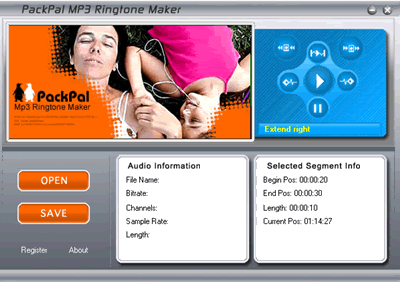
PackPal MP3 Ringtone Maker is a powerful audio cutter and super mp3 ringtone converter. With PackPal Mp3 Ringtone Maker, you can quickly make your own audio ringtones from most audio files such as MP3, WMA and WAV. And it builds audio cutter and ringtone converter in just one software.
With it's easy-to-use interface, you only need several simple steps to make your favorite music into ringtone. What you need to do is play the song you want to cut, then mark the start time and the end time. You can also accurately select your favorite part, and play before you save it, to make a fantastic ringtone.
PackPal MP3 Ringtone Maker can convert most of the audio files (MP3, WMA,WAV) to the most popular ringtone format which can be played on mobile phones – MP3 and AMR (AMR is a codec specially developed for GSM phones) with excellent output quality and high ripping speed.
FEATURES
* Cuts small part from a large auido file
* Can set the start-time/end-time just when pre-listening to the song
* No quality is lost
* Supports MP3, wav,wma input format
* Supports MP3, AMR output format
* View the MP3 file using wave graphics
* With built-in MP3 and WAV player, you can pre-listen to each section you want to convert before
* Provided with a slider bar, you can visually and quickly get to the point where you want to convert

Bookmark and Share

Please Buy The Original Version From authorize Seller Like: http://amazon.com, http://ebay.com, http://download.com


Share/Save/Bookmark

Convert PDF to Word, Excel and create PDFs from ANY

Posted by Polin at 9:29 AM 0 comments
http://i35.tinypic.com/16bzu3t.jpg
Convert PDF to Word, Excel and create PDFs from ANY
-PDF to Word Conversion.
-Convert your PDF files to Microsoft® Word documents for easy editing.
-PDF to Excel Conversion.
-Convert tables from your PDF files to Microsoft® Excel spreadsheets. Select pages or entire document.
-WYSIWYG Content Extraction.
-Convert selected tables or images from a PDF file. Creates tables in Word or Excel or image files.
-Quality Conversions.
-No need to waste hours reformatting and reworking your files.
-PDF Creation.
-Simply drag and drop. Easily create PDFs from your documents. WYSIWYG user interface.
-Batch-Process Conversions.
-Save time by using batch conversion palettes in the UI or using scripts from the command line.
password : Discuss-BB.org

Bookmark and Share

Please Buy The Original Version From authorize Seller Like: http://amazon.com, http://ebay.com, http://download.com


Share/Save/Bookmark

LightBox Plus 2.0

Posted by Polin at 9:27 AM 0 comments
http://i27.tinypic.com/eojsz.jpg
LightBox Plus 2.0

All operations in 48bits (16bit per channel), supporting working with 48bit files
RAW Support
Very fast and fluid controls. Most core routines written in machine level code for speed. Not WebBased, so it stays fast and powerful
Advanced and user controlled auto balancing functions
New Smart Contrast technology that brings the most out of your pictures
Red Eye Remover with face detection technology for easy use, with guaranteed redeye removal process
Smart Fill Light technology to fill in shadows while keeping your image looking real
Easy user interface and Interactive help throughout to help you use the very powerful image processing engine
Remove Color Casts with our new Gray Point algorithms to bring out the most of your image and to get rid of those underlying color casts that can make your picture seem murky. Our Remove Color Cast function can show you where there is a color cast that isnt obvious, but still affecting your image.
You can also print, crop, resize, rotate, and undo/redo, and all of the other amenities
Dodge And Burn. Make your picture dramatic by using a brush to apply dynamic darkening/conrast curves or bring up the highlights in the area you brush. We have a special Highlight mode that adds amazing contrast to your image as you use the brush.
Clone Brush. Get rid of power lines, trash cans, or just have fun cloning flowers, animals, and people. You can also remove scratches, skin blemishes, stains and spots.
Pro (Auto) Balance, a higher end version of the color balancer in the Free Version
Pro Saturation. Add amazing color to your image with 48bit, HSL and LAB mode saturation methods.
Photograph Filter and Tint. Make your picture, Warm, Cool,or any other shade. Add drama to a sunset or coolnes to a morning pasture.
Undo Brush. A very poweful function that allows you to go back through the history of your image and merge element, so you can just brush out what you want to change, throw away or keep. You can perform an action and just brush out what didnt work out, or brush in what did.
History View and Snapshots. Look through the history of your image editing at any stage, with up to unlimited undo, or take a snapshot. You can merge elements of one state to another with the UNDO brush, and create the perfect image.
Extremely poweful and simple masking. You can change the color of a car, or draw a circle with a brush around an object and bring it into the foreground, or make a vignette style picture. All you have to do is click on the image!
Dynamic Light, Shadows and highlights with Smart Contrast. Our advanced Shadows and Highlights outperforms the leading industry standards, and in combination with our Smart Contrast functions, you can bring up the shadows, bring down the highlights, all while keeping your image looking realistic and natural.
Blurring, Soft Blurring, and Sharpening. You can blur your image (and then undo part of it with the UNDO brush), or use a soft blur to make your image glow or to remove skind blemishes. You can combine advanced sharpening with the soft blur to give your image an impressive glow while keeping it sharp.

Bookmark and Share

Please Buy The Original Version From authorize Seller Like: http://amazon.com, http://ebay.com, http://download.com


Share/Save/Bookmark
 
Software Top Blogs Yahoo bot last visit powered by MyPagerank.Net Msn bot last visit powered by MyPagerank.Net Counter Powered by  RedCounter